# uitleg social gebruik

In dit hoofdstuk vind je de uitleg over hoe je de socials maakt, exporteert en door opus haalt.

# UITLEG socials vormgeving, exporteren en Opus

<span style="font-size: 12.0pt; line-height: 107%;">Wanneer gebruik je welk template? Met alle verschillende vormen van content die we maken kan het verwarrend zijn. In dit document een overzicht van wanneer je welk template gebruikt bij het maken van video’s. <span style="mso-spacerun: yes;"> </span>Let op dat je video’s voor Insta, TikTok en YT shorts in het juiste formaat exporteert!!! 1080x1920</span>

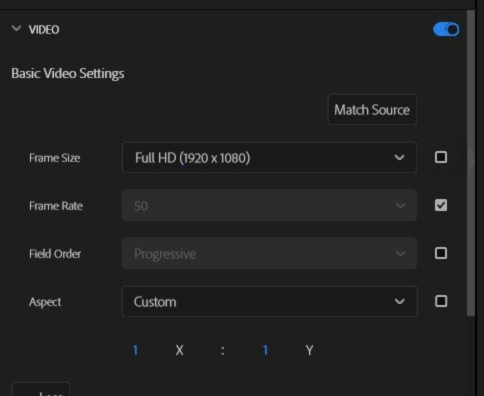
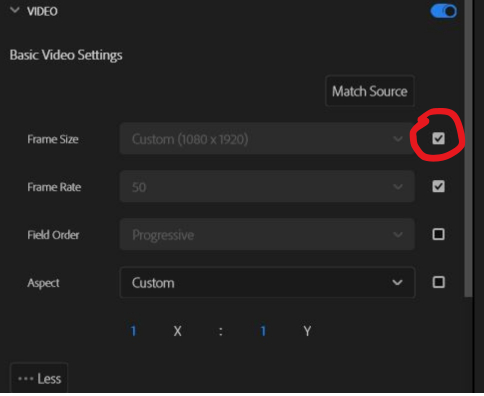
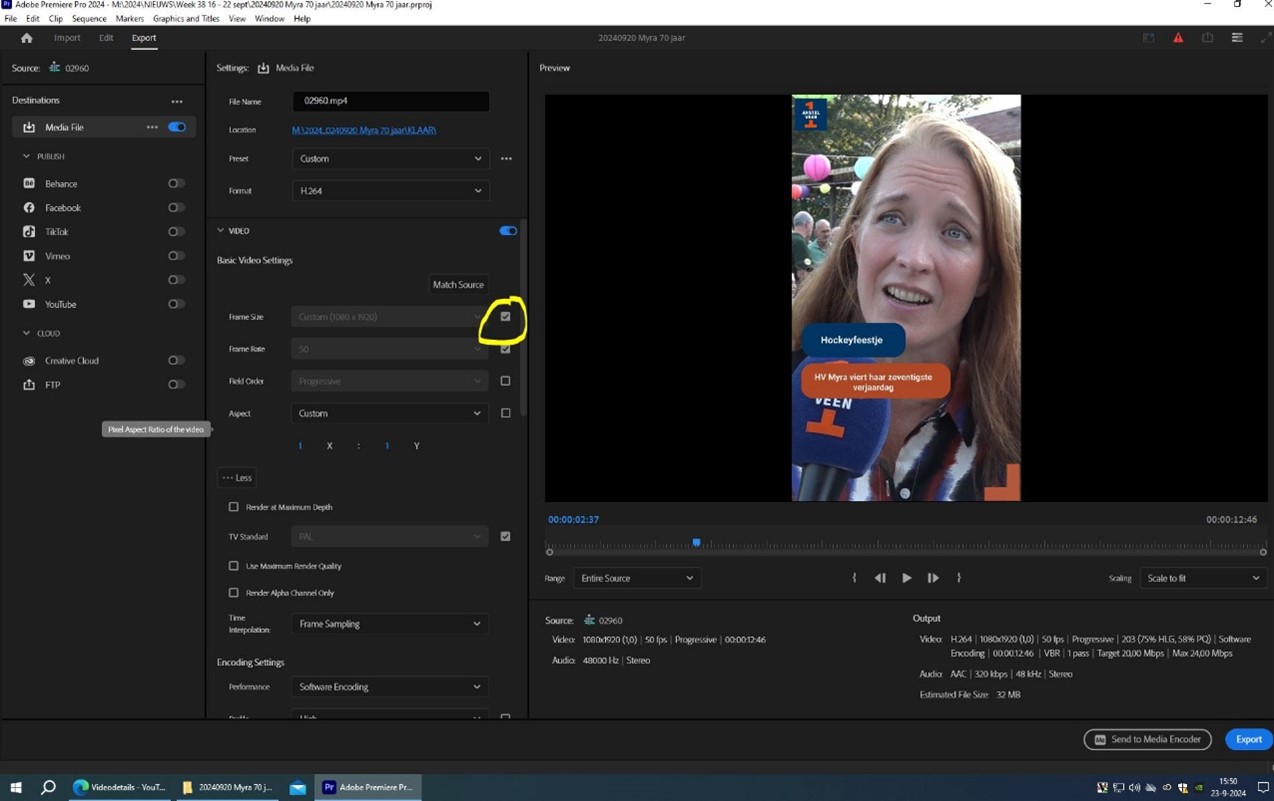
<span style="font-size: 12.0pt; line-height: 107%;">Vink altijd het vakje bij ‘FRAME SIZE’ aan. Dan springt ie automatisch naar het goede formaat</span>

<span style="font-size: 16.0pt; line-height: 107%; mso-no-proof: yes;">[![formaat exporteren bewerkt.png](https://bookstack.studio.rtva.nl/uploads/images/gallery/2025-07/scaled-1680-/tCMformaat-exporteren-bewerkt.png)](https://bookstack.studio.rtva.nl/uploads/images/gallery/2025-07/tCMformaat-exporteren-bewerkt.png)  
</span>

<span style="font-size: 16.0pt; line-height: 107%; mso-no-proof: yes;">[![formaat exporteren bewerkt 2.png](https://bookstack.studio.rtva.nl/uploads/images/gallery/2025-07/scaled-1680-/L2dformaat-exporteren-bewerkt-2.png)](https://bookstack.studio.rtva.nl/uploads/images/gallery/2025-07/L2dformaat-exporteren-bewerkt-2.png)</span>

<span style="font-size: 16.0pt; line-height: 107%;">Zorg ervoor dat je je premiere pro project in de juiste map zet!</span>

<span style="font-size: 16.0pt; line-height: 107%;">Insta Reel reportage (geldt ook voor tiktok &amp; YT shorts)</span>

<span style="color: #4472c4; mso-themecolor: accent1;">Insta reel 45 sec</span>: <span style="color: red;">beide balkjes zelf invullen </span>

<span style="color: #4472c4; mso-themecolor: accent1;">Eindscherm Instagram reel </span>

<span style="font-size: 16.0pt; line-height: 107%;"> </span>

<span style="font-size: 16.0pt; line-height: 107%;"> --------------------------------------------------</span>

<span style="font-size: 16.0pt; line-height: 107%;">Insta Reel tv programma </span>

<span style="color: #4472c4; mso-themecolor: accent1;">Insta reel 45 sec</span>: <span style="color: red;">bovenste balkje – onderwerp </span>

<span style="color: red;"><span style="mso-spacerun: yes;"> </span>Onderste balkje – Fragment van ‘programma <span style="mso-spacerun: yes;"> </span>\#nummer aflevering </span>

Voorbeeld: <span style="color: red;">Fragment van Stem van de Straat #104 </span>

<span style="color: #4472c4; mso-themecolor: accent1;">Eindscherm Instagram Reel </span>

<span style="font-size: 16.0pt; line-height: 107%;"> </span>

<span style="font-size: 16.0pt; line-height: 107%;"> --------------------------------------------------</span>

<span style="font-size: 16.0pt; line-height: 107%;"> </span>

<span style="font-size: 16.0pt; line-height: 107%;">Facebook teaser reportage</span>

<span style="color: #4472c4; mso-themecolor: accent1;">Facebook video 45 sec</span>: <span style="color: red;">beide balkjes zelf invullen </span>

<span style="color: #4472c4; mso-themecolor: accent1;">Eindscherm facebook </span>

VERGEET NIET DE LINK TOE TE VOEGEN AAN HET FB BERICHT!

<span style="font-size: 16.0pt; line-height: 107%;"> </span>

<span style="font-size: 16.0pt; line-height: 107%;"> --------------------------------------------------</span>

<span style="font-size: 16.0pt; line-height: 107%;">Facebook teaser tv programma</span>

<span style="color: #4472c4; mso-themecolor: accent1;">Facebook video 45 sec:</span><span style="color: red;"><span style="mso-spacerun: yes;"> </span>Bovenste balkje – onderwerp </span>

<span style="color: red;"><span style="mso-spacerun: yes;"> </span><span style="mso-tab-count: 1;"> </span><span style="mso-spacerun: yes;"> </span>Onderste balkje – Fragment van ‘programma <span style="mso-spacerun: yes;"> </span>\#nummer aflevering </span>

Voorbeeld: <span style="color: red;">Fragment van Stem van de Straat #104 </span>

<span style="color: #4472c4; mso-themecolor: accent1;">Eindscherm facebook </span>

<span style="font-size: 16.0pt; line-height: 107%;"> --------------------------------------------------</span>

<span style="font-size: 16.0pt; line-height: 107%;">TV versie </span>

<span style="color: #4472c4; mso-themecolor: accent1;">Logo rechts bovenin tv </span>

<span style="color: #4472c4; mso-themecolor: accent1;">Titel van video</span>: <span style="color: red;">balkje bovenin – onderwerp </span>

<span style="color: red;"><span style="mso-spacerun: yes;"> </span>Balkje onderin – datum </span>( voorbeeld: <span style="color: red;">maandag 24 februari</span>)

<span style="font-size: 12.0pt; line-height: 107%;">Geen eindscherm!</span>

<span style="font-size: 12.0pt; line-height: 107%;"> </span>

<span style="font-size: 12.0pt; line-height: 107%;">Exporteren: preset – medium bitrate</span>

<span style="font-size: 12.0pt; line-height: 107%;">Video – hardware encoding</span>

<span style="font-size: 12.0pt; line-height: 107%;">Exporteren naar de playout map</span>

<span style="font-size: 12.0pt; line-height: 107%;"> <span style="font-size: 16.0pt; line-height: 107%;"> --------------------------------------------------</span></span>

<span style="font-size: 16.0pt; line-height: 107%;">Youtube versie </span>

<span style="color: #4472c4; mso-themecolor: accent1;">Titel van video</span>: <span style="color: red;">balkje bovenin – onderwerp </span>

<span style="color: red;"><span style="mso-spacerun: yes;"> </span>Balkje onderin – zelf invullen</span>

<span style="color: #4472c4; mso-themecolor: accent1;">Eindscherm tv</span>

<span style="font-size: 16.0pt; line-height: 107%;"> </span>

Exporteren: High Quality 1080p HD

1920 X 1080

<span style="font-size: 16.0pt; line-height: 107%;"> --------------------------------------------------</span>

<span style="font-size: 16.0pt; line-height: 107%;">Opus</span>

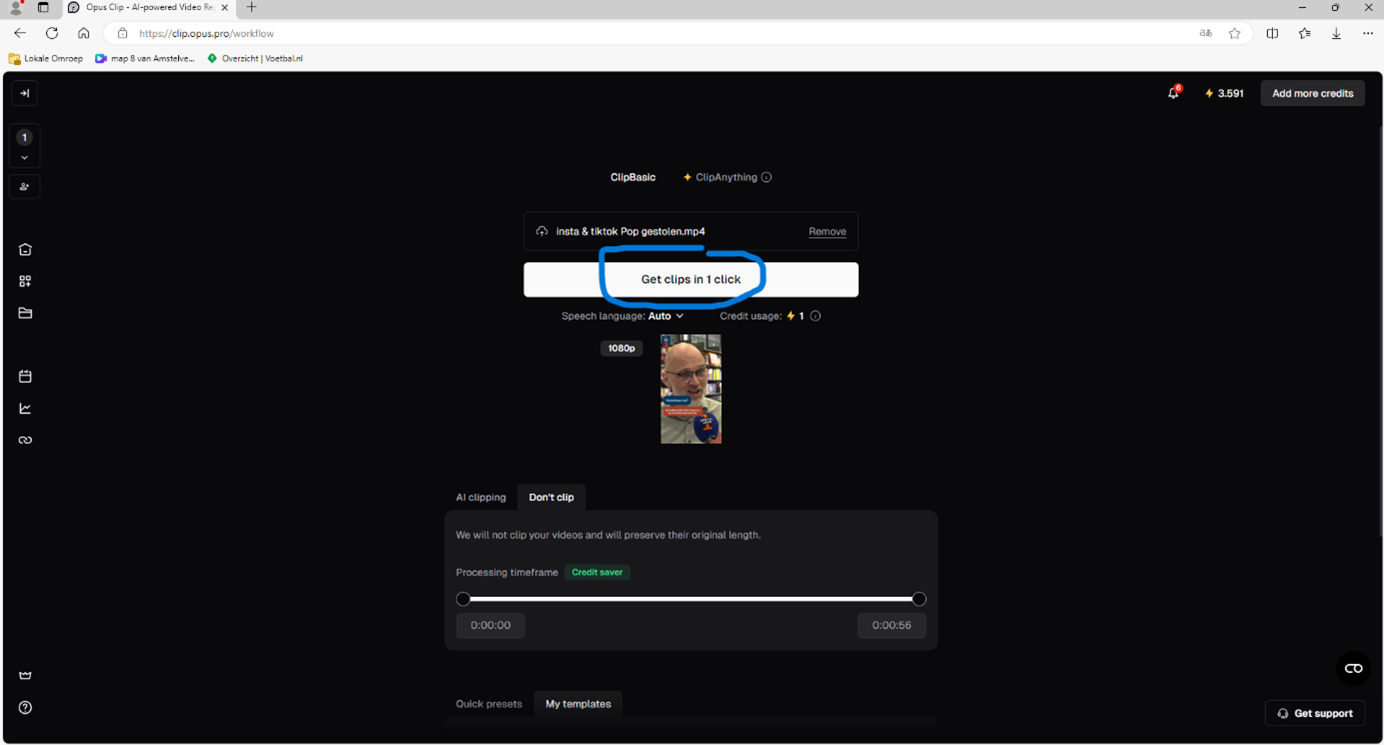
<span style="font-size: 16.0pt; line-height: 107%;">Upload je social video </span><span style="font-size: 16.0pt; line-height: 107%; font-family: Wingdings; mso-ascii-font-family: Calibri; mso-ascii-theme-font: minor-latin; mso-hansi-font-family: Calibri; mso-hansi-theme-font: minor-latin; mso-char-type: symbol; mso-symbol-font-family: Wingdings;"><span style="mso-char-type: symbol; mso-symbol-font-family: Wingdings;">à</span></span><span style="font-size: 16.0pt; line-height: 107%;"> klik op get clips in one click </span>

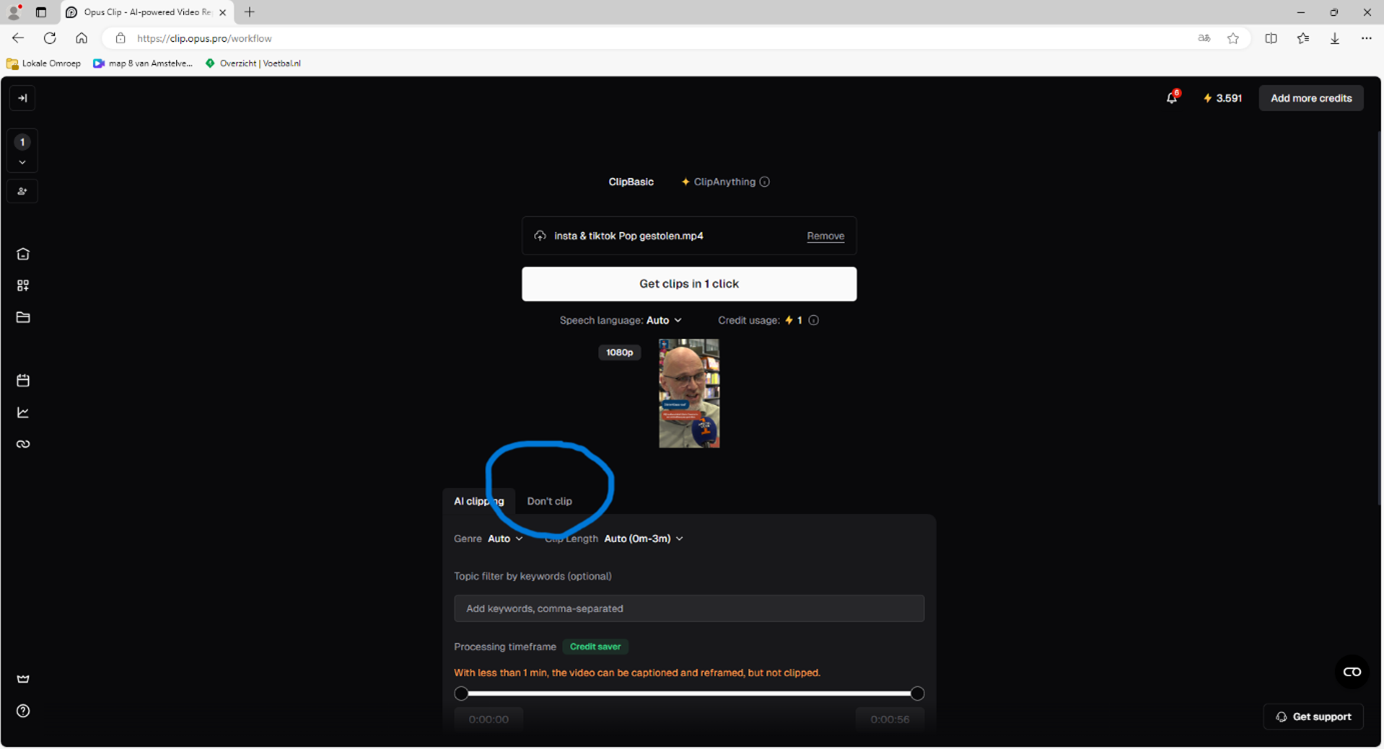
<span style="font-size: 16.0pt; line-height: 107%;">Als de video geüpload is: selecteer ‘don’t clip’. Je hebt immers zelf al de clip gemaakt. </span><span style="font-size: 16.0pt; line-height: 107%; font-family: Wingdings; mso-ascii-font-family: Calibri; mso-ascii-theme-font: minor-latin; mso-hansi-font-family: Calibri; mso-hansi-theme-font: minor-latin; mso-char-type: symbol; mso-symbol-font-family: Wingdings;"><span style="mso-char-type: symbol; mso-symbol-font-family: Wingdings;">à</span></span><span style="font-size: 16.0pt; line-height: 107%;"> klik weer op get clips in one click</span>

<span style="font-size: 16.0pt; line-height: 107%;"> </span>

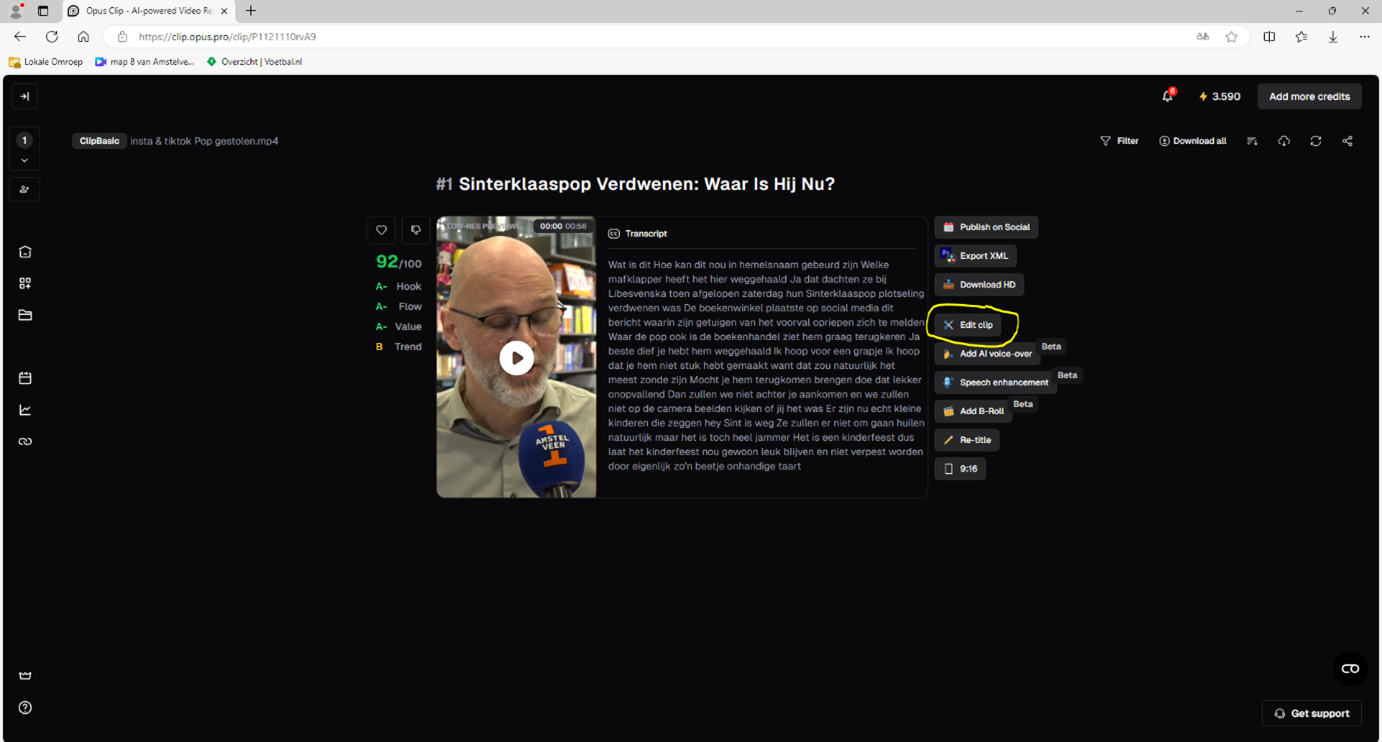
<span style="font-size: 16.0pt; line-height: 107%;">Als je clip geladen is, kijk hem dan goed na! Speel hem 1keer af en kijk goed voor exportfouten, lees de ondertiteling mee. Is deze niet goed (90% van de tijd) klik dan op ‘edit clip’.</span>

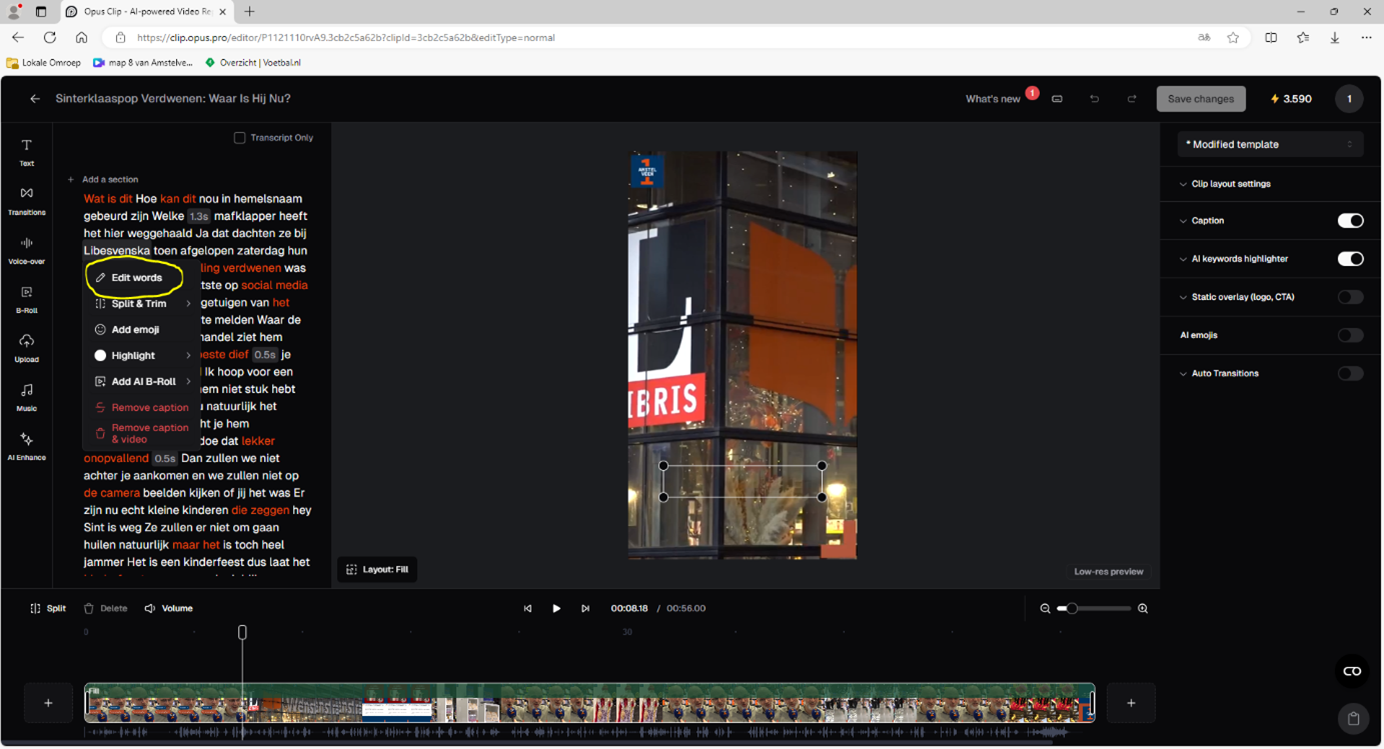
<span style="font-size: 16.0pt; line-height: 107%;">Herstel te spelfouten waar nodig. </span>

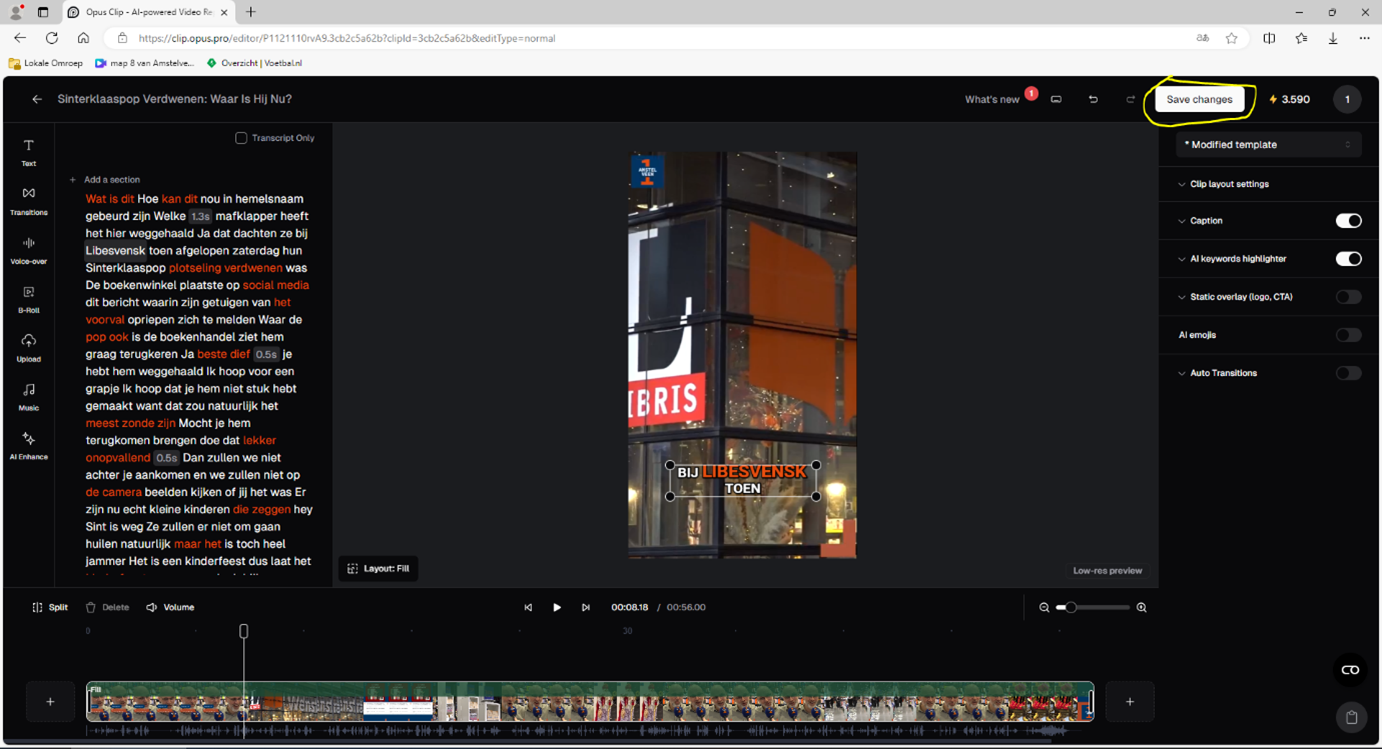
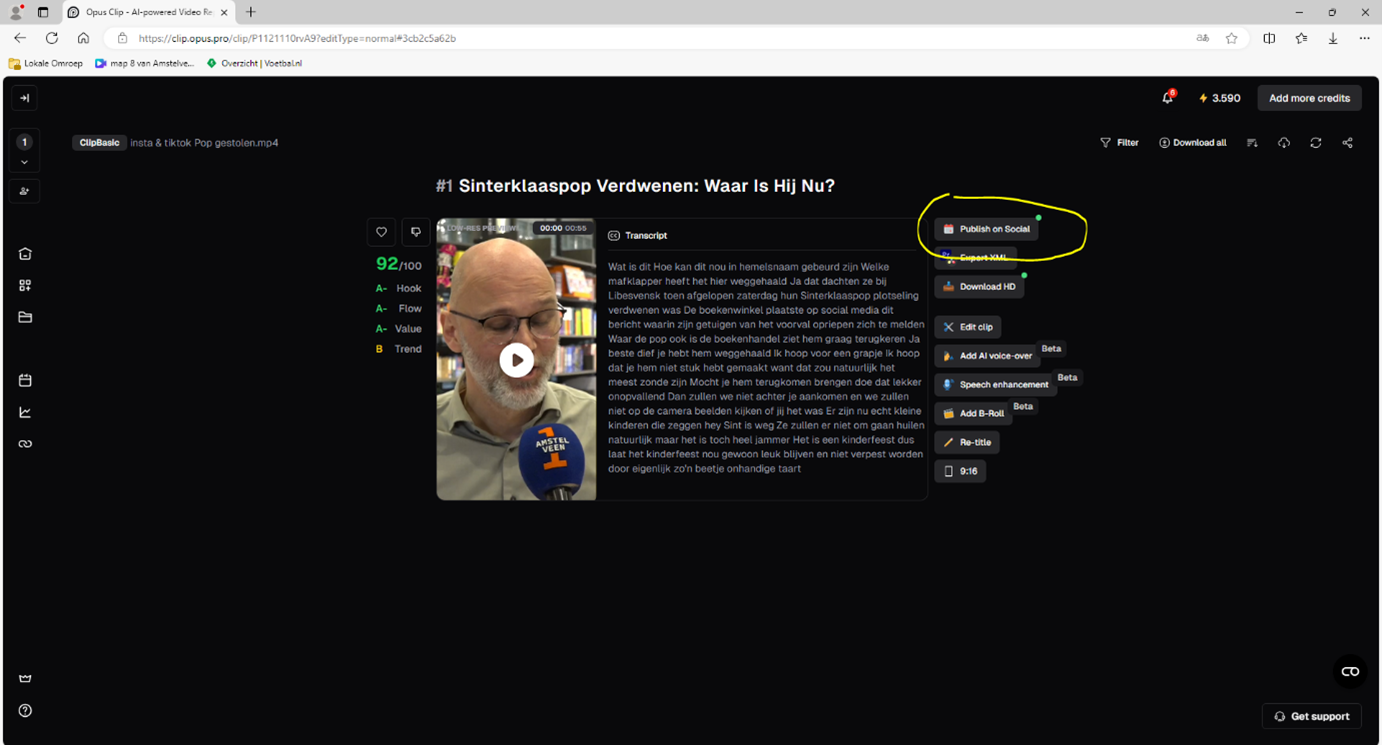
<span style="font-size: 16.0pt; line-height: 107%;">Klaar? Klik op ‘save changes’, wacht tot de veranderingen zijn opgeslagen en klik dan op ‘export’ </span><span style="font-size: 16.0pt; line-height: 107%; font-family: Wingdings; mso-ascii-font-family: Calibri; mso-ascii-theme-font: minor-latin; mso-hansi-font-family: Calibri; mso-hansi-theme-font: minor-latin; mso-char-type: symbol; mso-symbol-font-family: Wingdings;"><span style="mso-char-type: symbol; mso-symbol-font-family: Wingdings;">à</span></span><span style="font-size: 16.0pt; line-height: 107%;"> ‘publish on social’.</span>

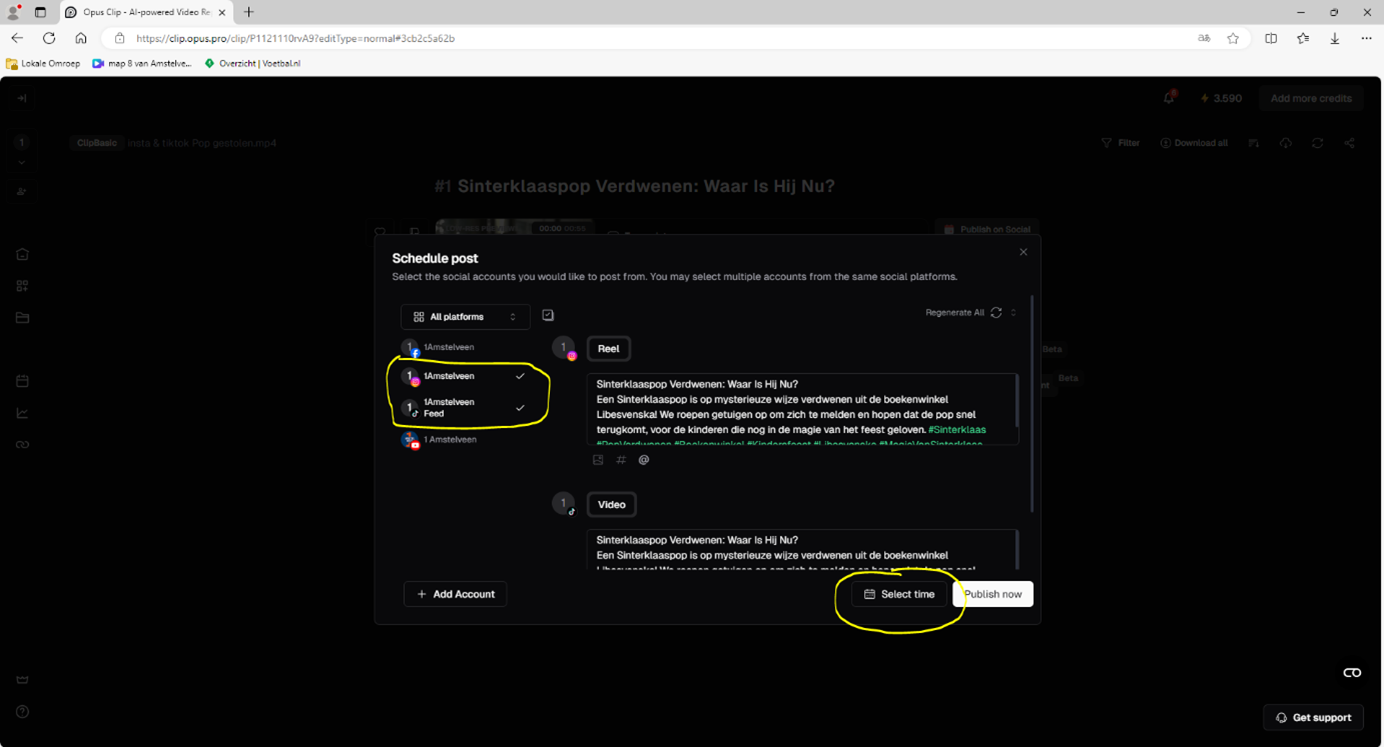
<span style="font-size: 16.0pt; line-height: 107%;">Zorg ervoor dat in de linkerbalk de juiste social media platforms aangevinkt staan !!! (Voor reels altijd insta, tiktok en yt shorts)</span>

<span style="font-size: 16.0pt; line-height: 107%;">Pas de A.I. gegenereerde tekst van opus aan en bedenk zelf iets passends. Kopieer deze tekst en plak het bij ieder platform. </span>

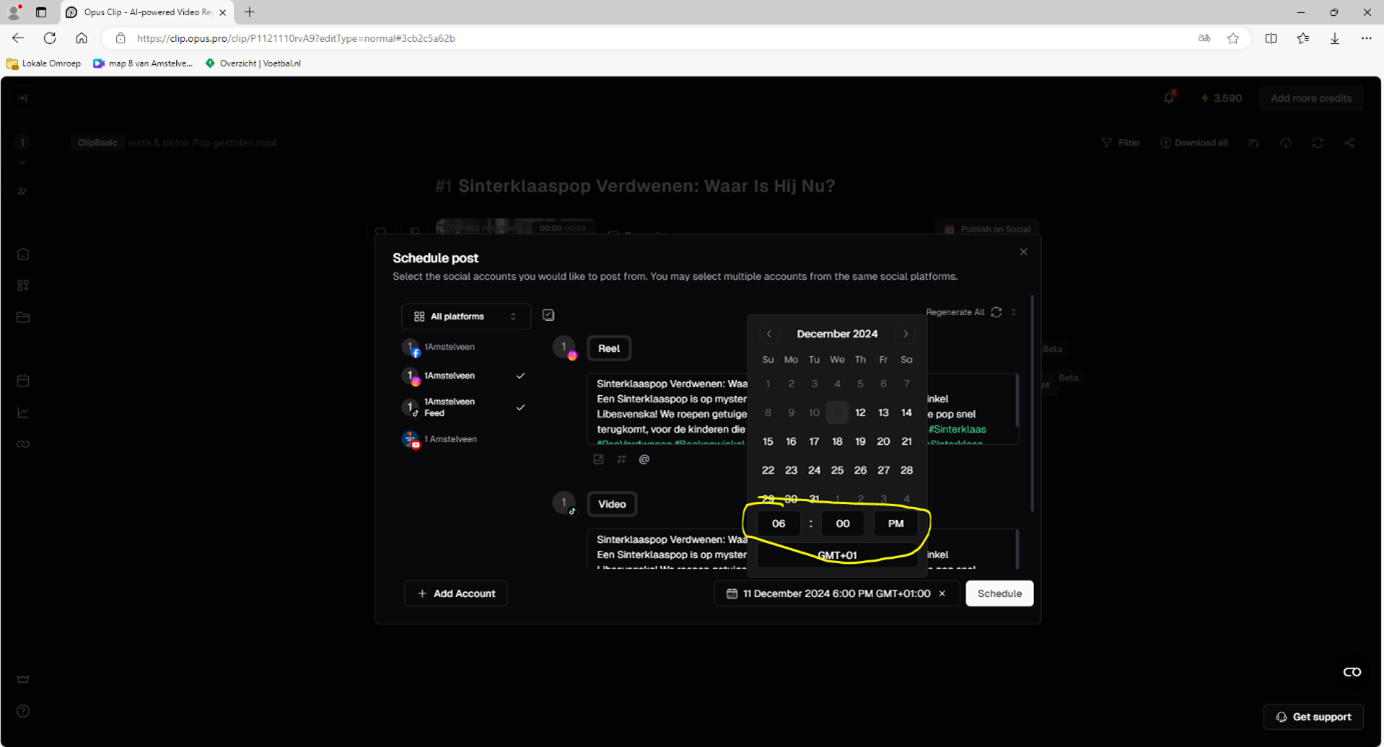
<span style="font-size: 16.0pt; line-height: 107%;">Om in te plannen: klik op select time en kies de juiste dag/tijd. Let op het verschil in AM en PM!! </span>

<span style="font-size: 16.0pt; line-height: 107%;">De vaste tijden zijn 15:00, 18:00 en 21:00. Kijk op het social schema in de redactieruimte voor welke plek vrij is. </span>

<span style="font-size: 16.0pt; line-height: 107%;">Schedule je post en klaar is kees, je kan nog dubbelchecken of het goed ingepland staat door in opus naar de kalender te gaan.</span>

<span style="font-size: 16.0pt; line-height: 107%;"> </span>

<span style="font-size: 16.0pt; line-height: 107%;"> </span>

<span style="font-size: 16.0pt; line-height: 107%;"><span style="mso-spacerun: yes;"></span></span>

# UITLEG hoe maak ik een reel

<span style="font-size: 16.0pt; line-height: 107%;">Bij 1Amstelveen gaan we meer inzetten op het bereiken van jongere doelgroepen zoals ‘Gen Z’ en ‘Gen Alpha’. Dit gaan we doen via bijvoorbeeld Instagram reels, hoe je deze inhoudelijk maakt ga ik in deze uitleg niet op in, maar wel hoe je deze korte video technisch in elkaar zet!</span>

<span style="font-size: 20.0pt; line-height: 107%;">We beginnen bij het begin:</span>

<span style="font-size: 16.0pt; line-height: 107%; mso-bidi-font-family: Calibri; mso-bidi-theme-font: minor-latin;"><span style="mso-list: Ignore;">1.<span style="font: 7.0pt 'Times New Roman';"> </span></span></span><span style="font-size: 16.0pt; line-height: 107%;">Open Premieré Pro.</span>

<span style="font-size: 16.0pt; line-height: 107%; mso-bidi-font-family: Calibri; mso-bidi-theme-font: minor-latin;"><span style="mso-list: Ignore;">2.<span style="font: 7.0pt 'Times New Roman';"> </span></span></span><span style="font-size: 16.0pt; line-height: 107%;">Klik op ‘nieuw bestand’ of ‘New Project’.</span>

<span style="font-size: 16.0pt; line-height: 107%; mso-bidi-font-family: Calibri; mso-bidi-theme-font: minor-latin;"><span style="mso-list: Ignore;">3.<span style="font: 7.0pt 'Times New Roman';"> </span></span></span><span style="font-size: 16.0pt; line-height: 107%;">Geef je project een naam en sla deze op een goede plek op.</span>

<span style="font-size: 16.0pt; line-height: 107%; mso-bidi-font-family: Calibri; mso-bidi-theme-font: minor-latin;"><span style="mso-list: Ignore;">4.<span style="font: 7.0pt 'Times New Roman';"> </span></span></span><span style="font-size: 16.0pt; line-height: 107%;">Klik op ‘create’.</span>

<span style="font-size: 16.0pt; line-height: 107%; mso-bidi-font-family: Calibri; mso-bidi-theme-font: minor-latin;"><span style="mso-list: Ignore;">5.<span style="font: 7.0pt 'Times New Roman';"> </span></span></span><span style="font-size: 16.0pt; line-height: 107%;">Voeg beelden toe aan het project en sleep deze vervolgens naar de ‘timeline’.</span>

<span style="font-size: 16.0pt; line-height: 107%; mso-bidi-font-family: Calibri; mso-bidi-theme-font: minor-latin;"><span style="mso-list: Ignore;">6.<span style="font: 7.0pt 'Times New Roman';"> </span></span></span><span style="font-size: 16.0pt; line-height: 107%;">Kijk links bovenin in het scherm bij ‘Sequence’.</span>

<span style="font-size: 16.0pt; line-height: 107%; mso-bidi-font-family: Calibri; mso-bidi-theme-font: minor-latin;"><span style="mso-list: Ignore;">7.<span style="font: 7.0pt 'Times New Roman';"> </span></span></span><span style="font-size: 16.0pt; line-height: 107%;">Klik op ‘Sequence Settings’.</span>

<span style="font-size: 16.0pt; line-height: 107%; mso-bidi-font-family: Calibri; mso-bidi-theme-font: minor-latin;"><span style="mso-list: Ignore;">8.<span style="font: 7.0pt 'Times New Roman';"> </span></span></span><span style="font-size: 16.0pt; line-height: 107%;">Kijk bij het stukje ‘video’.</span>

<span style="font-size: 16.0pt; line-height: 107%; mso-bidi-font-family: Calibri; mso-bidi-theme-font: minor-latin;"><span style="mso-list: Ignore;">9.<span style="font: 7.0pt 'Times New Roman';"> </span></span></span><span style="font-size: 16.0pt; line-height: 107%;">Voer bij ‘frame size’, het getal ‘1080’ in bij ‘horizontal’ en bij ‘vertical’ het getal ‘1920’. </span>

<span style="font-size: 16.0pt; line-height: 107%; mso-bidi-font-family: Calibri; mso-bidi-theme-font: minor-latin;"><span style="mso-list: Ignore;">10.<span style="font: 7.0pt 'Times New Roman';"> </span></span></span><span style="font-size: 16.0pt; line-height: 107%;">Nu heeft de sequence de Instagram reel, tiktok, en YouTube short afmeting, van 9:16. </span>

<span style="font-size: 16.0pt; line-height: 107%; mso-bidi-font-family: Calibri; mso-bidi-theme-font: minor-latin;"><span style="mso-list: Ignore;">11.<span style="font: 7.0pt 'Times New Roman';"> </span></span></span><span style="font-size: 16.0pt; line-height: 107%;">Ga naar de panel ‘effect controls’. **Als** je deze niet ziet; ga dan naar ‘window’-&gt; en klik op ‘effect controls’.</span>

<span style="font-size: 16.0pt; line-height: 107%; mso-bidi-font-family: Calibri; mso-bidi-theme-font: minor-latin;"><span style="mso-list: Ignore;">12.<span style="font: 7.0pt 'Times New Roman';"> </span></span></span><span style="font-size: 16.0pt; line-height: 107%;">Klik in te tijdlijn op de door jou geïmporteerde beelden. </span>

<span style="font-size: 16.0pt; line-height: 107%; mso-bidi-font-family: Calibri; mso-bidi-theme-font: minor-latin;"><span style="mso-list: Ignore;">13.<span style="font: 7.0pt 'Times New Roman';"> </span></span></span><span style="font-size: 16.0pt; line-height: 107%;">En zoom in de ‘effect controls’ panel bij ‘scale’ in op het onderwerp van jouw video, zodoende dat er geen zwarte balkjes te zien zijn. </span>

<span style="font-size: 16.0pt; line-height: 107%; mso-bidi-font-family: Calibri; mso-bidi-theme-font: minor-latin;"><span style="mso-list: Ignore;">14.<span style="font: 7.0pt 'Times New Roman';"> </span></span></span><span style="font-size: 16.0pt; line-height: 107%;">Gebruik vervolgens ‘position’ om het onderwerp van je video in beeld te zetten, en als deze beweegt moet je het klokje links van position gebruiken om via keyframes het onderwerp in beeld te houden.</span>

<span style="font-size: 16.0pt; line-height: 107%;"> </span>

**<span style="font-size: 16.0pt; line-height: 107%;">Kijk op de volgende bladzijde -&gt;</span>**

<span style="font-size: 20.0pt; line-height: 107%;">Nu zorgen dat alles er mooi uit ziet! </span>

<span style="font-size: 16.0pt; line-height: 107%; mso-bidi-font-family: Calibri; mso-bidi-theme-font: minor-latin;"><span style="mso-list: Ignore;">1.<span style="font: 7.0pt 'Times New Roman';"> </span></span></span><span style="font-size: 16.0pt; line-height: 107%;">Ga naar de panel ‘Essential Graphics’. **Als** je deze niet ziet ga dan naar ‘window’ en klik op ‘Essentials graphics’. </span>

<span style="font-size: 16.0pt; line-height: 107%; mso-bidi-font-family: Calibri; mso-bidi-theme-font: minor-latin;"><span style="mso-list: Ignore;">2.<span style="font: 7.0pt 'Times New Roman';"> </span></span></span><span style="font-size: 16.0pt; line-height: 107%;">Klik binnen het ‘essential graphics’ panel op ‘browse’. </span>

<span style="font-size: 16.0pt; line-height: 107%; mso-bidi-font-family: Calibri; mso-bidi-theme-font: minor-latin;"><span style="mso-list: Ignore;">3.<span style="font: 7.0pt 'Times New Roman';"> </span></span></span><span style="font-size: 16.0pt; line-height: 107%;">Zoek naar ‘insta reel 45 sec’ in het zoekbalkje.</span>

<span style="font-size: 16.0pt; line-height: 107%; mso-bidi-font-family: Calibri; mso-bidi-theme-font: minor-latin;"><span style="mso-list: Ignore;">4.<span style="font: 7.0pt 'Times New Roman';"> </span></span></span><span style="font-size: 16.0pt; line-height: 107%;">Sleep het nu te zien sjabloon naar de project panel en plaats deze boven je beelden.</span>

<span style="font-size: 16.0pt; line-height: 107%; mso-bidi-font-family: Calibri; mso-bidi-theme-font: minor-latin;"><span style="mso-list: Ignore;">5.<span style="font: 7.0pt 'Times New Roman';"> </span></span></span><span style="font-size: 16.0pt; line-height: 107%;">Selecteer op de tijdlijn het sjabloon en pas in het ‘properties’ panel de tekst van je sjabloon aan.</span>

<span style="font-size: 16.0pt; line-height: 107%; mso-bidi-font-family: Calibri; mso-bidi-theme-font: minor-latin;"><span style="mso-list: Ignore;">6.<span style="font: 7.0pt 'Times New Roman';"> </span></span></span><span style="font-size: 16.0pt; line-height: 107%;">Je kunt het lettertype wijzigen, de grootte, en uiteraard wat er staat.</span>

<span style="font-size: 16.0pt; line-height: 107%; mso-bidi-font-family: Calibri; mso-bidi-theme-font: minor-latin;"><span style="mso-list: Ignore;">7.<span style="font: 7.0pt 'Times New Roman';"> </span></span></span><span style="font-size: 16.0pt; line-height: 107%;">Zorg ervoor dat je de tekst bij ‘titel’ niet **kleiner** **dan 45** maakt en niet **groter dan 65**. En bij ‘context’ niet **kleiner dan 40** en niet **groter dan 60**’. De titel moet bij voorkeur 1 woord zijn</span>

<span style="font-size: 16.0pt; line-height: 107%; mso-bidi-font-family: Calibri; mso-bidi-theme-font: minor-latin;"><span style="mso-list: Ignore;">8.<span style="font: 7.0pt 'Times New Roman';"> </span></span></span><span style="font-size: 16.0pt; line-height: 107%;">Zorg ervoor dat je tekst binnen het balkje blijft en dit er mooi uitziet. Als je veel tekst hebt maak je de tekst kleiner en als je weinig tekst hebt maak je de tekst groter. Kijk voor voorbeelden op onze Instagram pagina</span>

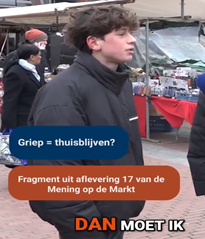
<span style="font-size: 16.0pt; line-height: 107%; mso-bidi-font-family: Calibri; mso-bidi-theme-font: minor-latin;"><span style="mso-list: Ignore;">9.<span style="font: 7.0pt 'Times New Roman';"> </span></span></span>**<span style="font-size: 16.0pt; line-height: 107%;">BELANGRIJK! </span>**<span style="font-size: 16.0pt; line-height: 107%;">Als je een REEL maakt van een interview of reportage kan je zelf voor beide balkjes de tekst bepalen. Maak je een REEL van een vast programma (De 8, SvdS, ModM) dan zet je in het bovenste balkje het onderwerp en bij de onderste: Fragment uit aflevering … van …. (zie voorbeeld hieronder). Let goed op de hoofdletters!!!</span>

**<span style="font-size: 16.0pt; line-height: 107%; mso-no-proof: yes;">[![Afbeelding1.png](https://bookstack.studio.rtva.nl/uploads/images/gallery/2025-07/scaled-1680-/afbeelding1.png)](https://bookstack.studio.rtva.nl/uploads/images/gallery/2025-07/afbeelding1.png)  
</span>**

<span style="font-size: 16.0pt; line-height: 107%;"> </span>

<span style="font-size: 20.0pt; line-height: 107%;">Je bent er bijna!</span>

<span style="font-size: 16.0pt; line-height: 107%; mso-bidi-font-family: Calibri; mso-bidi-theme-font: minor-latin;"><span style="mso-list: Ignore;">1.<span style="font: 7.0pt 'Times New Roman';"> </span></span></span><span style="font-size: 16.0pt; line-height: 107%;">Ga nu binnen het ‘essentail graphics’ panel weer naar ‘browse’.</span>

<span style="font-size: 16.0pt; line-height: 107%; mso-bidi-font-family: Calibri; mso-bidi-theme-font: minor-latin;"><span style="mso-list: Ignore;">2.<span style="font: 7.0pt 'Times New Roman';"> </span></span></span><span style="font-size: 16.0pt; line-height: 107%;">En zoek naar ‘eindscherm instagram reel’. </span>

<span style="font-size: 16.0pt; line-height: 107%; mso-bidi-font-family: Calibri; mso-bidi-theme-font: minor-latin;"><span style="mso-list: Ignore;">3.<span style="font: 7.0pt 'Times New Roman';"> </span></span></span><span style="font-size: 16.0pt; line-height: 107%;">Sleep het sjabloon die nu te zien is naar het einde van jouw video op de tijdlijn, en plaats deze bovenop jouw laatste beelden.</span>

<span style="font-size: 16.0pt; line-height: 107%; mso-bidi-font-family: Calibri; mso-bidi-theme-font: minor-latin;"><span style="mso-list: Ignore;">4.<span style="font: 7.0pt 'Times New Roman';"> </span></span></span><span style="font-size: 16.0pt; line-height: 107%;">Je hoeft hier niks aan te passen, zorg alleen voor dat de timing van het sjabloon klopt.</span>

<span style="font-size: 20.0pt; line-height: 107%;"> </span>

<span style="font-size: 20.0pt; line-height: 107%;">Volgende bladzijde </span><span style="font-size: 20.0pt; line-height: 107%; font-family: Wingdings; mso-ascii-font-family: Calibri; mso-ascii-theme-font: minor-latin; mso-hansi-font-family: Calibri; mso-hansi-theme-font: minor-latin; mso-char-type: symbol; mso-symbol-font-family: Wingdings;"><span style="mso-char-type: symbol; mso-symbol-font-family: Wingdings;">à</span></span>

<span style="font-size: 20.0pt; line-height: 107%;">Nu de video exporteren </span>

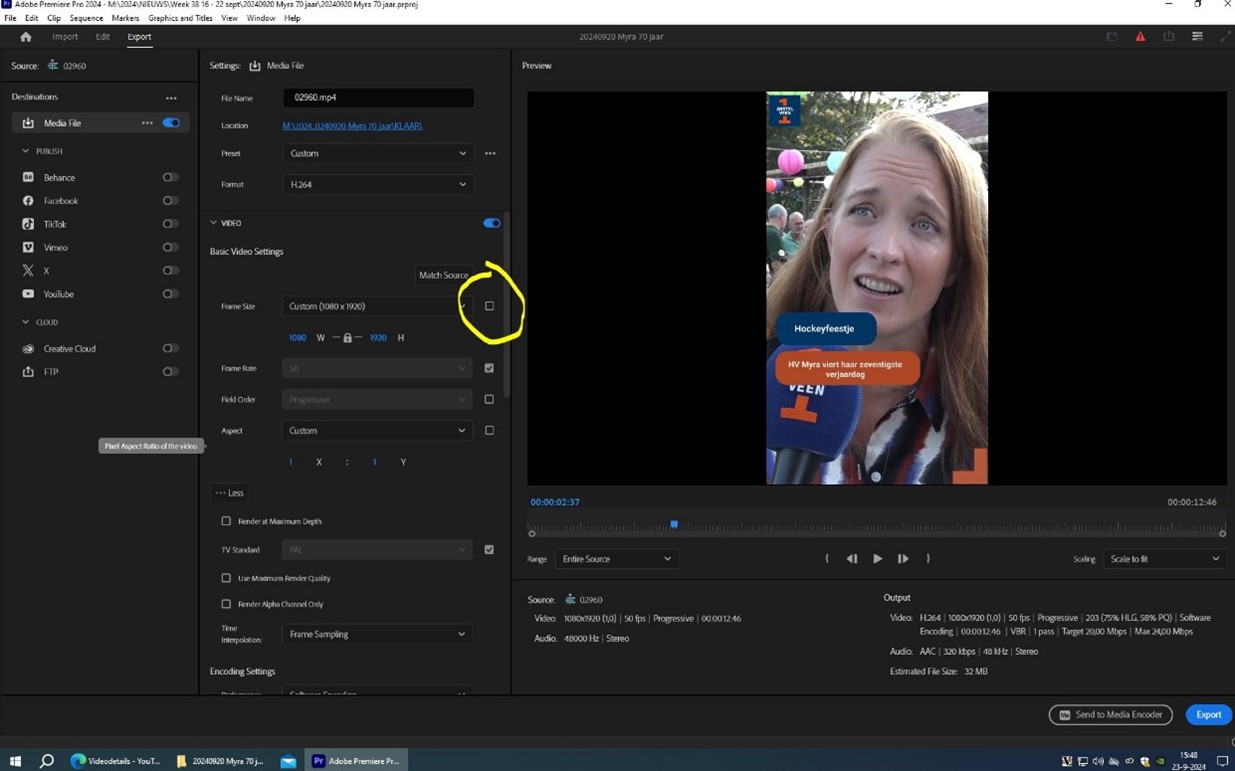
<span style="font-size: 20.0pt; line-height: 107%;">Ga naar export en dan volgt dit scherm:</span>

<span style="font-size: 20.0pt; line-height: 107%;">Vink dit knopje (gele rondje) aan <span style="mso-no-proof: yes;"></span></span>

<span style="font-size: 20.0pt; line-height: 107%;">[![Afbeelding2.jpg](https://bookstack.studio.rtva.nl/uploads/images/gallery/2025-07/scaled-1680-/afbeelding2.jpg)](https://bookstack.studio.rtva.nl/uploads/images/gallery/2025-07/afbeelding2.jpg)</span>

<span style="mso-ignore: vglayout; position: absolute; z-index: 251659264; left: 0px; margin-left: 274px; margin-top: 320px; width: 128px; height: 64px;">![](file:///C:/Users/Regie/AppData/Local/Temp/msohtmlclip1/01/clip_image005.png)</span><span style="font-size: 20.0pt; line-height: 107%;">Zodat de export ook echt in 9:16 wordt geëxporteerd<span style="mso-no-proof: yes;"></span></span>

<span style="font-size: 20.0pt; line-height: 107%;">[![Afbeelding3.jpg](https://bookstack.studio.rtva.nl/uploads/images/gallery/2025-07/scaled-1680-/afbeelding3.jpg)](https://bookstack.studio.rtva.nl/uploads/images/gallery/2025-07/afbeelding3.jpg)</span>

<span style="font-size: 20.0pt; line-height: 107%;">Controleer bij het gele vierkant of de afmetingen ook echt zijn overgenomen en klik nu op export.</span>

<span style="font-size: 16.0pt; line-height: 107%;"> </span>

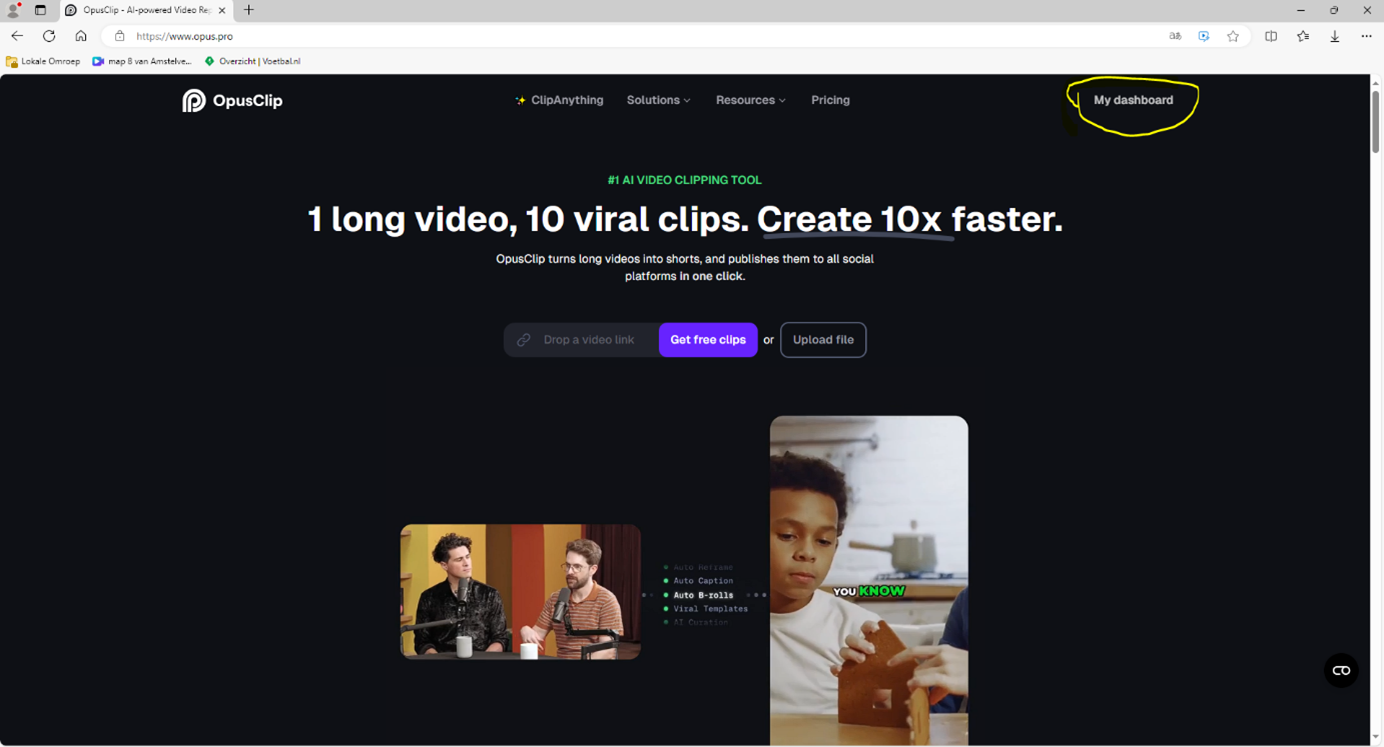
<span style="font-size: 16.0pt; line-height: 107%;">Nadat je het geëxporteerd hebt ga je naar de browser en zoek je naar ‘opus clip pro’ </span>

<span style="font-size: 16.0pt; line-height: 107%;">Dan kom je op dit scherm, selecteer hier ‘My dashboard’</span>

<span style="font-size: 16.0pt; line-height: 107%;">[![Afbeelding4.png](https://bookstack.studio.rtva.nl/uploads/images/gallery/2025-07/scaled-1680-/afbeelding4.png)](https://bookstack.studio.rtva.nl/uploads/images/gallery/2025-07/afbeelding4.png)</span>

<span style="font-size: 16.0pt; line-height: 107%; mso-no-proof: yes;">  
</span>

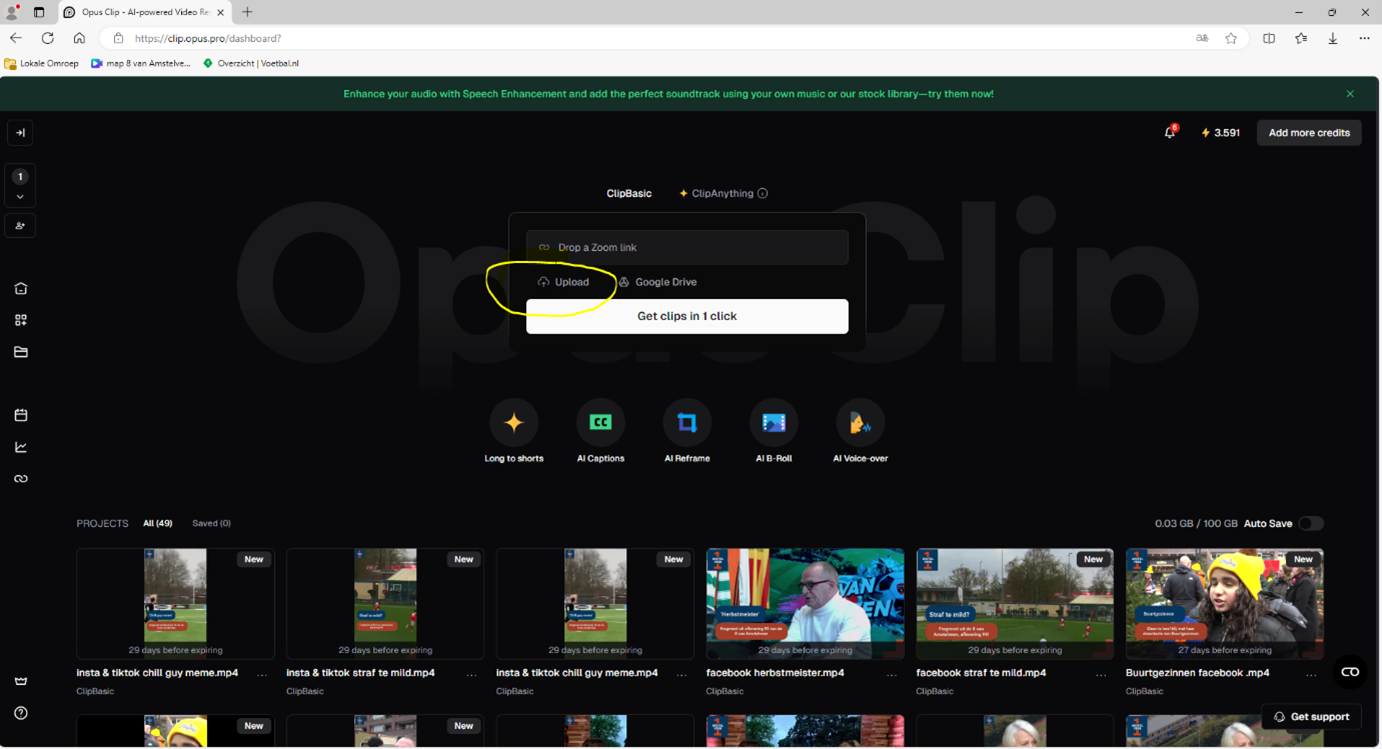
<span style="font-size: 16.0pt; line-height: 107%;">Dan kom je in dit scherm en klik je op upload</span>

<span style="font-size: 16.0pt; line-height: 107%;">[![Afbeelding5.png](https://bookstack.studio.rtva.nl/uploads/images/gallery/2025-07/scaled-1680-/afbeelding5.png)](https://bookstack.studio.rtva.nl/uploads/images/gallery/2025-07/afbeelding5.png)</span>

<span style="font-size: 16.0pt; line-height: 107%; mso-no-proof: yes;">  
</span>

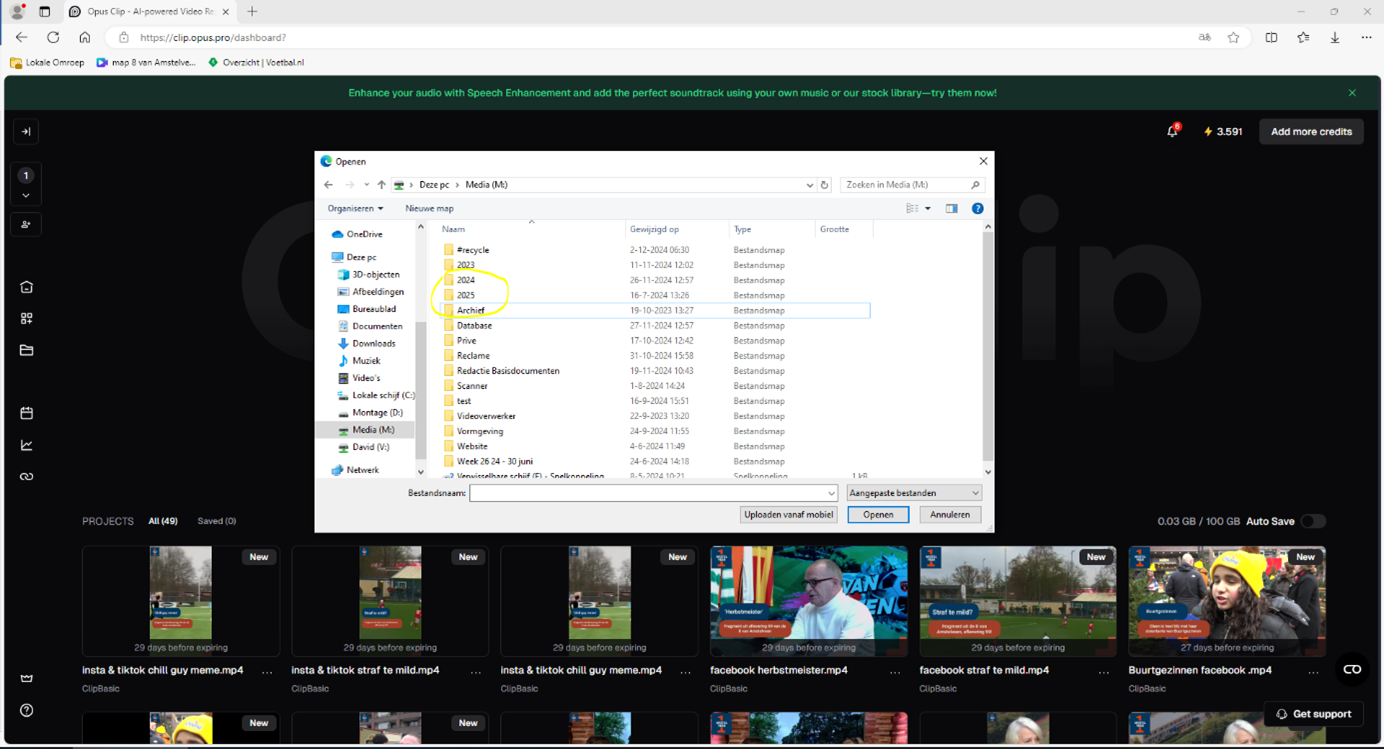
<span style="font-size: 16.0pt; line-height: 107%;">Dan kom je in dit scherm <span style="mso-no-proof: yes;"></span></span>

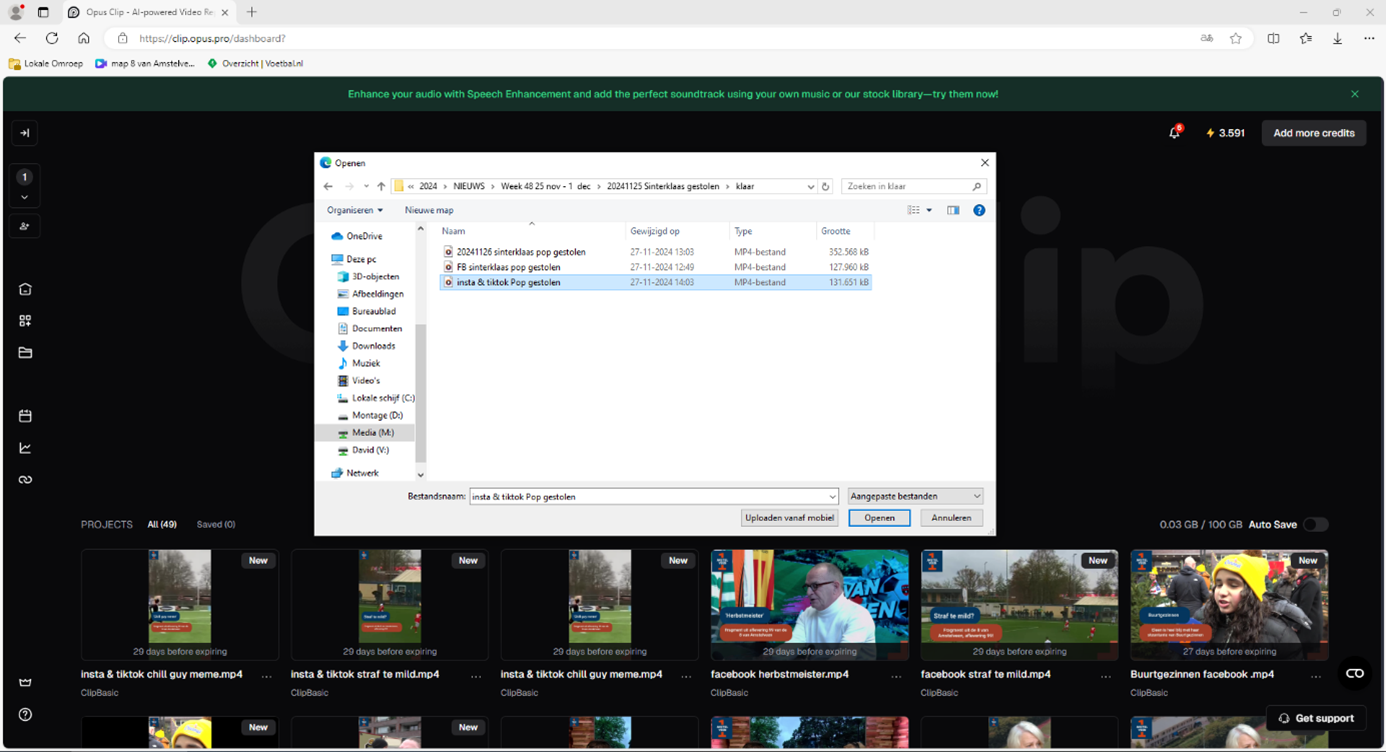
<span style="font-size: 16.0pt; line-height: 107%;">[![Afbeelding6.png](https://bookstack.studio.rtva.nl/uploads/images/gallery/2025-07/scaled-1680-/afbeelding6.png)](https://bookstack.studio.rtva.nl/uploads/images/gallery/2025-07/afbeelding6.png)</span>

<span style="font-size: 16.0pt; line-height: 107%;">Selecteer de video die je wil ondertitelen, bijvoorbeeld deze en klik op ‘openen’</span>

<span style="font-size: 16.0pt; line-height: 107%; mso-no-proof: yes;">[![Afbeelding7.png](https://bookstack.studio.rtva.nl/uploads/images/gallery/2025-07/scaled-1680-/afbeelding7.png)](https://bookstack.studio.rtva.nl/uploads/images/gallery/2025-07/afbeelding7.png)  
</span>

<span style="font-size: 16.0pt; line-height: 107%;">Daarna kom je in dit scherm en klik je op “don’t clip”<span style="mso-no-proof: yes;"> </span></span>

<span style="font-size: 16.0pt; line-height: 107%;"><span style="mso-no-proof: yes;">[![Afbeelding8.png](https://bookstack.studio.rtva.nl/uploads/images/gallery/2025-07/scaled-1680-/afbeelding8.png)](https://bookstack.studio.rtva.nl/uploads/images/gallery/2025-07/afbeelding8.png)</span></span>

<span style="font-size: 16.0pt; line-height: 107%;">En klik daarna op get clips in 1 click<span style="mso-no-proof: yes;"></span></span>

<span style="font-size: 16.0pt; line-height: 107%;">[![Afbeelding9.png](https://bookstack.studio.rtva.nl/uploads/images/gallery/2025-07/scaled-1680-/afbeelding9.png)](https://bookstack.studio.rtva.nl/uploads/images/gallery/2025-07/afbeelding9.png)</span>

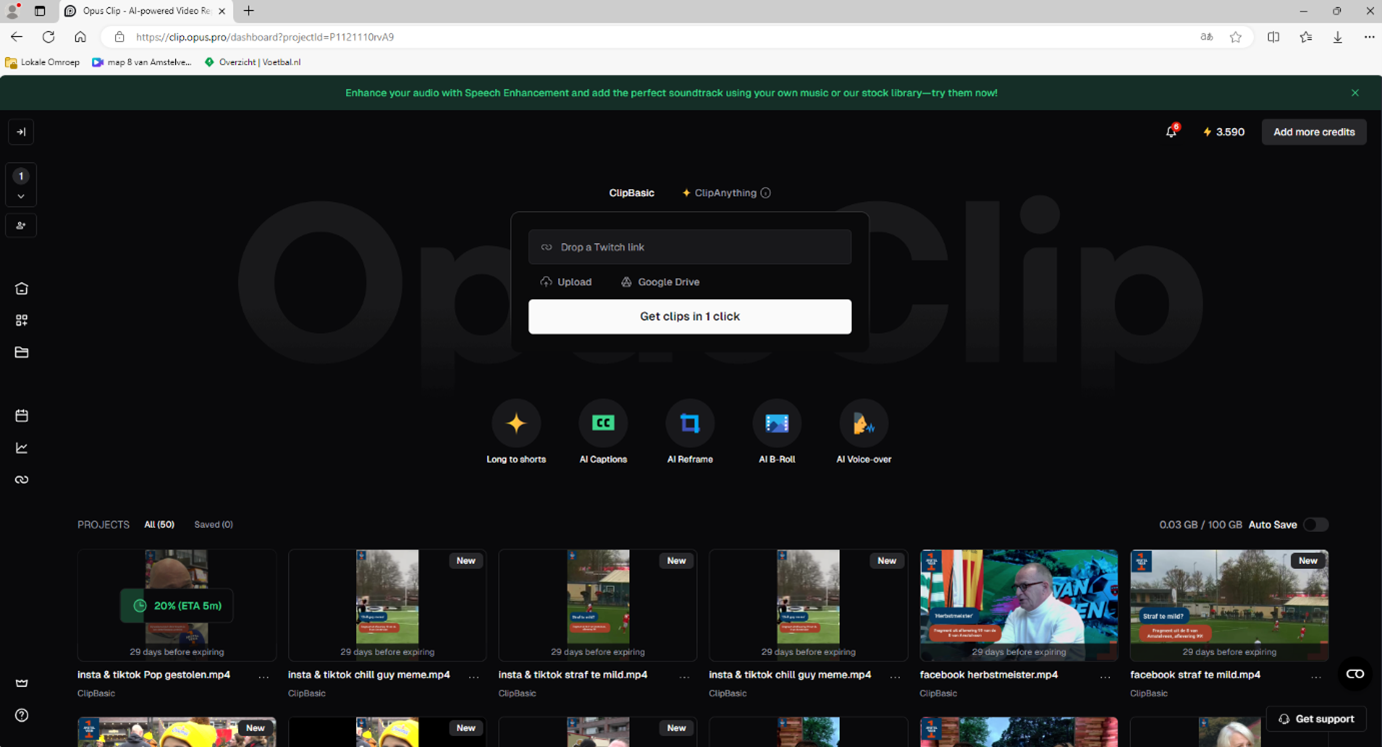
<span style="font-size: 16.0pt; line-height: 107%;">Even wachten… <span style="mso-no-proof: yes;"></span></span>

<span style="font-size: 16.0pt; line-height: 107%;">[![Afbeelding10.png](https://bookstack.studio.rtva.nl/uploads/images/gallery/2025-07/scaled-1680-/afbeelding10.png)](https://bookstack.studio.rtva.nl/uploads/images/gallery/2025-07/afbeelding10.png)</span>

<span style="font-size: 16.0pt; line-height: 107%;">Klik als de wachttijd voorbij is op de klik en daarna op ‘edit clip’<span style="mso-no-proof: yes;"></span></span>

<span style="font-size: 16.0pt; line-height: 107%;">[![Afbeelding11.png](https://bookstack.studio.rtva.nl/uploads/images/gallery/2025-07/scaled-1680-/afbeelding11.png)](https://bookstack.studio.rtva.nl/uploads/images/gallery/2025-07/afbeelding11.png)</span>

<span style="font-size: 16.0pt; line-height: 107%;">Pas daarna woorden aan door op een woord te klikken en daarna ‘edit words te selecteren’</span>

<span style="font-size: 16.0pt; line-height: 107%;">[![Afbeelding12.png](https://bookstack.studio.rtva.nl/uploads/images/gallery/2025-07/scaled-1680-/afbeelding12.png)](https://bookstack.studio.rtva.nl/uploads/images/gallery/2025-07/afbeelding12.png)</span>

<span style="font-size: 16.0pt; line-height: 107%; mso-no-proof: yes;">  
</span>

<span style="font-size: 16.0pt; line-height: 107%;">Als je dat gedaan hebt klik je op ‘save changes’<span style="mso-no-proof: yes;"></span></span>

<span style="font-size: 16.0pt; line-height: 107%;">[![Afbeelding13.png](https://bookstack.studio.rtva.nl/uploads/images/gallery/2025-07/scaled-1680-/afbeelding13.png)](https://bookstack.studio.rtva.nl/uploads/images/gallery/2025-07/afbeelding13.png)</span>

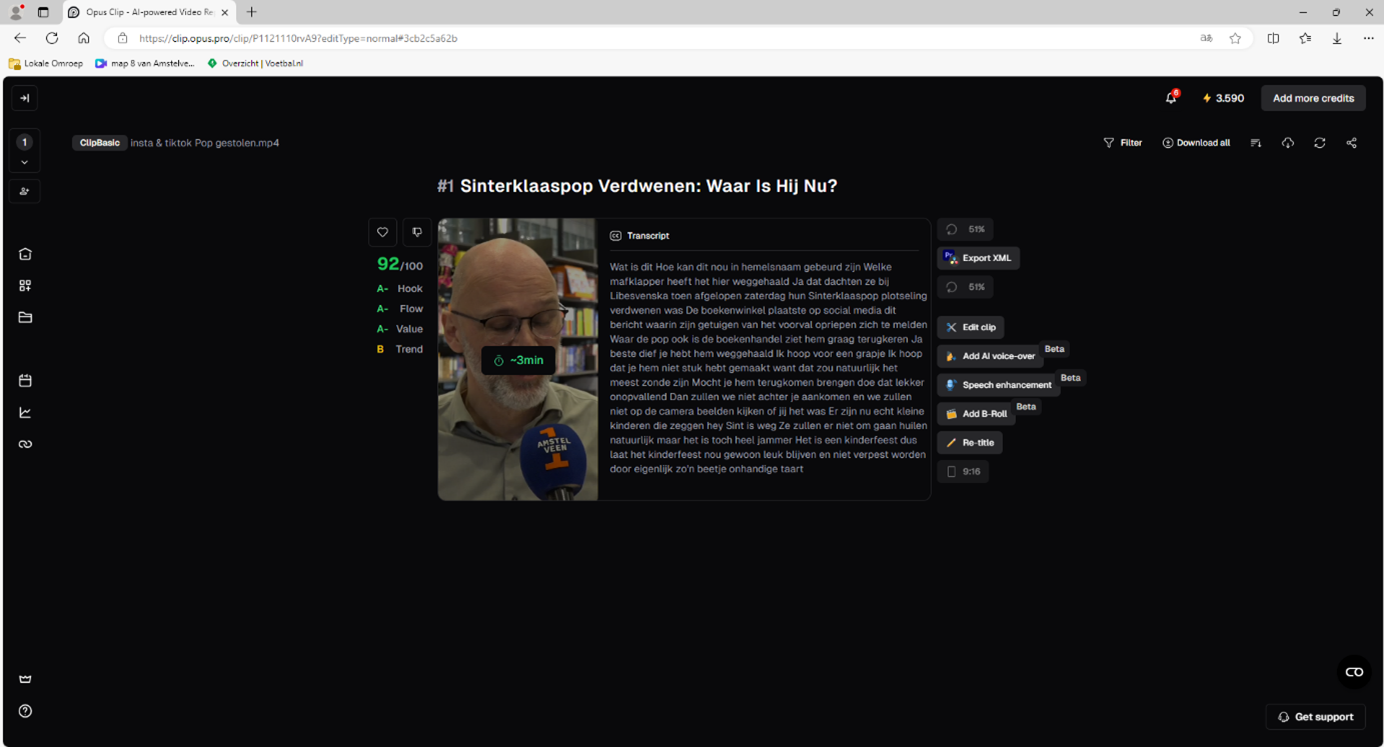
<span style="font-size: 16.0pt; line-height: 107%;">Nog een keer wachten …</span>

<span style="font-size: 16.0pt; line-height: 107%;">[![Afbeelding14.png](https://bookstack.studio.rtva.nl/uploads/images/gallery/2025-07/scaled-1680-/afbeelding14.png)](https://bookstack.studio.rtva.nl/uploads/images/gallery/2025-07/afbeelding14.png)</span>

<span style="font-size: 16.0pt; line-height: 107%; mso-no-proof: yes;">  
</span>

<span style="font-size: 16.0pt; line-height: 107%;">Als de video klaar is klik je op ‘publish on social’<span style="mso-no-proof: yes;"></span></span>

<span style="font-size: 16.0pt; line-height: 107%;"> [![Afbeelding15.png](https://bookstack.studio.rtva.nl/uploads/images/gallery/2025-07/scaled-1680-/afbeelding15.png)](https://bookstack.studio.rtva.nl/uploads/images/gallery/2025-07/afbeelding15.png)</span>

<span style="font-size: 16.0pt; line-height: 107%;"> </span>

<span style="font-size: 16.0pt; line-height: 107%;">Dan volgt dit scherm waar je zorgt dat allen Instagram en Tiktok geselecteerd zijn. Daarna Klik je op select time waar je de social media berichten kunt inplannen<span style="mso-no-proof: yes;"></span></span>

<span style="font-size: 16.0pt; line-height: 107%;">[![Afbeelding16.png](https://bookstack.studio.rtva.nl/uploads/images/gallery/2025-07/scaled-1680-/afbeelding16.png)](https://bookstack.studio.rtva.nl/uploads/images/gallery/2025-07/afbeelding16.png)</span>

<span style="font-size: 16.0pt; line-height: 107%;">Selecteer de data, qua tijden gaat de voorkeur naar 3 tijden:</span>

<span style="font-size: 16.0pt; line-height: 107%; font-family: Symbol; mso-fareast-font-family: Symbol; mso-bidi-font-family: Symbol;"><span style="mso-list: Ignore;">·<span style="font: 7.0pt 'Times New Roman';"> </span></span></span><span style="font-size: 16.0pt; line-height: 107%;">3 pm (15:00) op deze de 3<sup>e</sup> belangrijkste</span>

<span style="font-size: 16.0pt; line-height: 107%; font-family: Symbol; mso-fareast-font-family: Symbol; mso-bidi-font-family: Symbol;"><span style="mso-list: Ignore;">·<span style="font: 7.0pt 'Times New Roman';"> </span></span></span><span style="font-size: 16.0pt; line-height: 107%;">6 pm (18:00) op deze tijd plaats je de belangrijkste social</span>

<span style="font-size: 16.0pt; line-height: 107%; font-family: Symbol; mso-fareast-font-family: Symbol; mso-bidi-font-family: Symbol;"><span style="mso-list: Ignore;">·<span style="font: 7.0pt 'Times New Roman';"> </span></span></span><span style="font-size: 16.0pt; line-height: 107%;">9 pm (21:00) op deze de 2<sup>e</sup> belangrijkste</span>

<span style="font-size: 16.0pt; line-height: 107%;"><span style="mso-spacerun: yes;"> </span>en klik daarna op ‘schedule’</span>

<span style="font-size: 16.0pt; line-height: 107%;">[![Afbeelding17.png](https://bookstack.studio.rtva.nl/uploads/images/gallery/2025-07/scaled-1680-/afbeelding17.png)](https://bookstack.studio.rtva.nl/uploads/images/gallery/2025-07/afbeelding17.png)</span>

<span style="font-size: 16.0pt; line-height: 107%; mso-no-proof: yes;">  
</span>